1. Summary
The Confluence app “Meetical Meetings” helps you to follow the best practice that every key meeting should have a Confluence page linked to the calendar event of the meeting!
Following this best practice will make it easy to prepare the agenda, gather input from participants, take notes collaboratively, record important decisions, assign and track action items, and document relevant knowledge.
The main feature of Meetical is the seamless calendar integration. You can generate the list of participants from the calendar and automatically create meeting pages for recurring meetings.
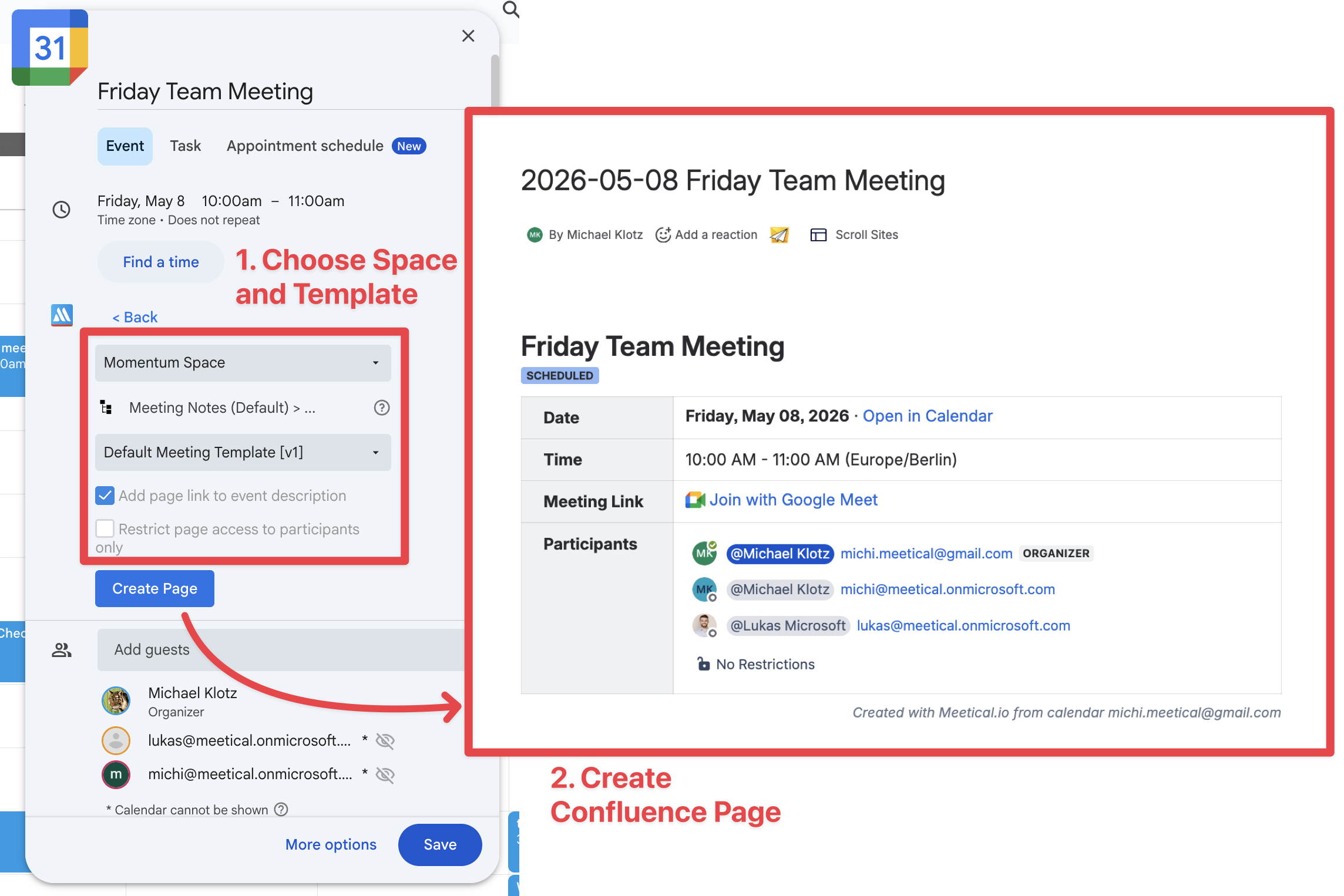
Create and share meeting pages faster
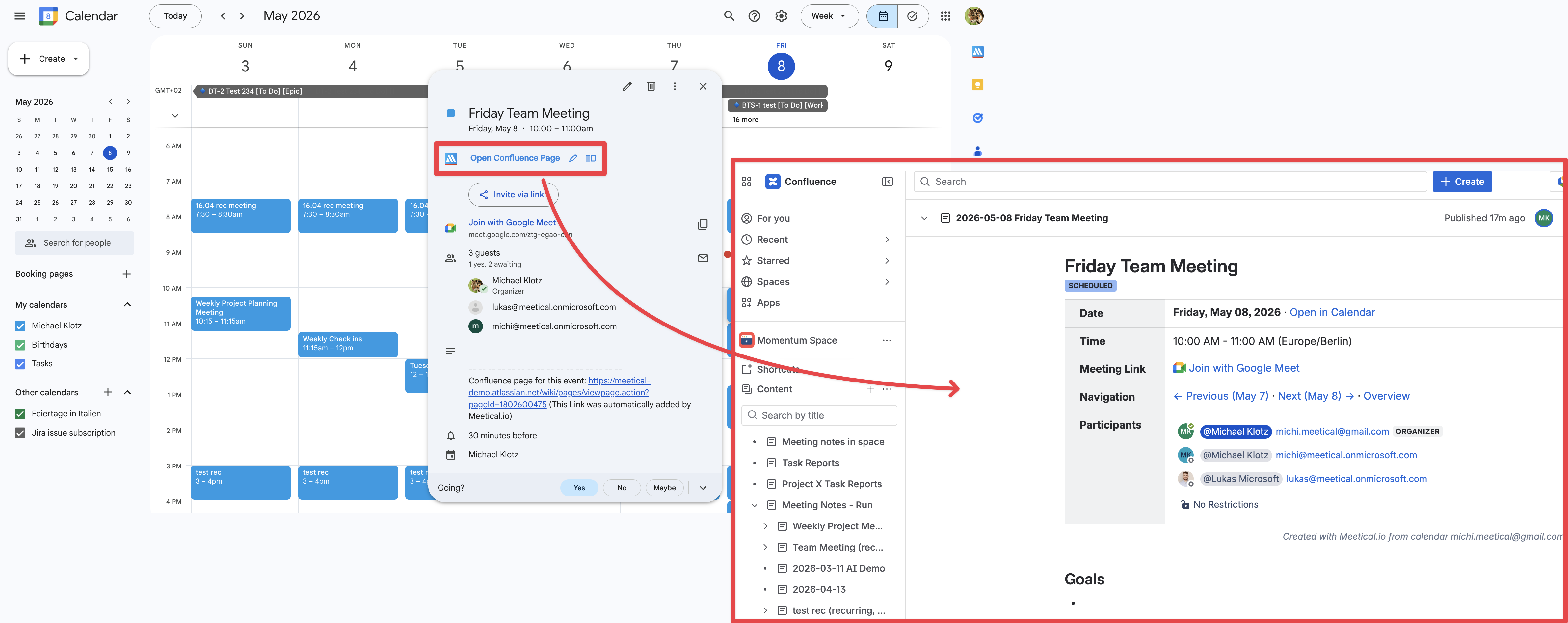
Find agenda and meeting notes faster
Seamless integration of Google Calendar and Confluence with our browser extensions!
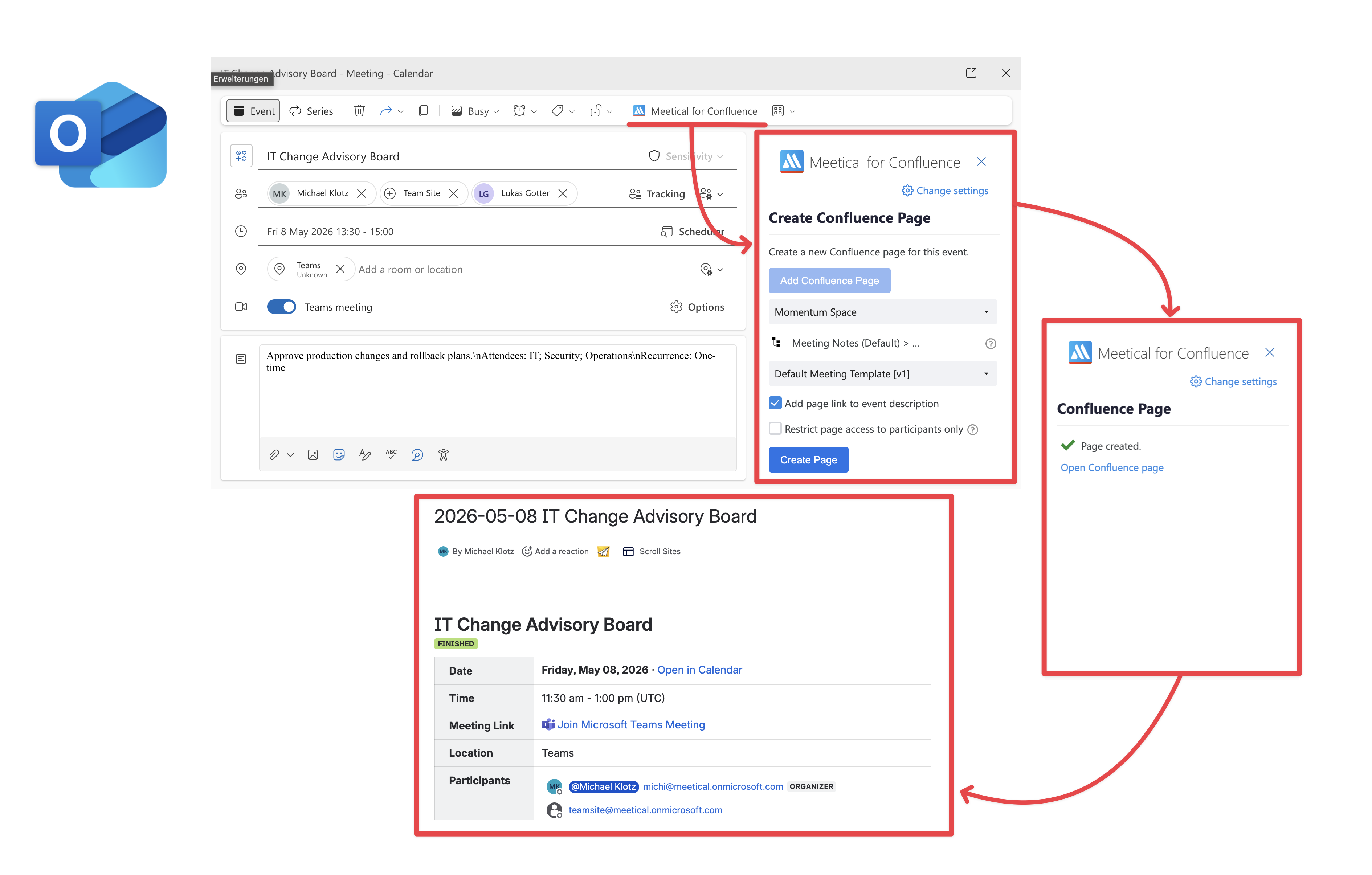
The Outlook Add-in for Confluence
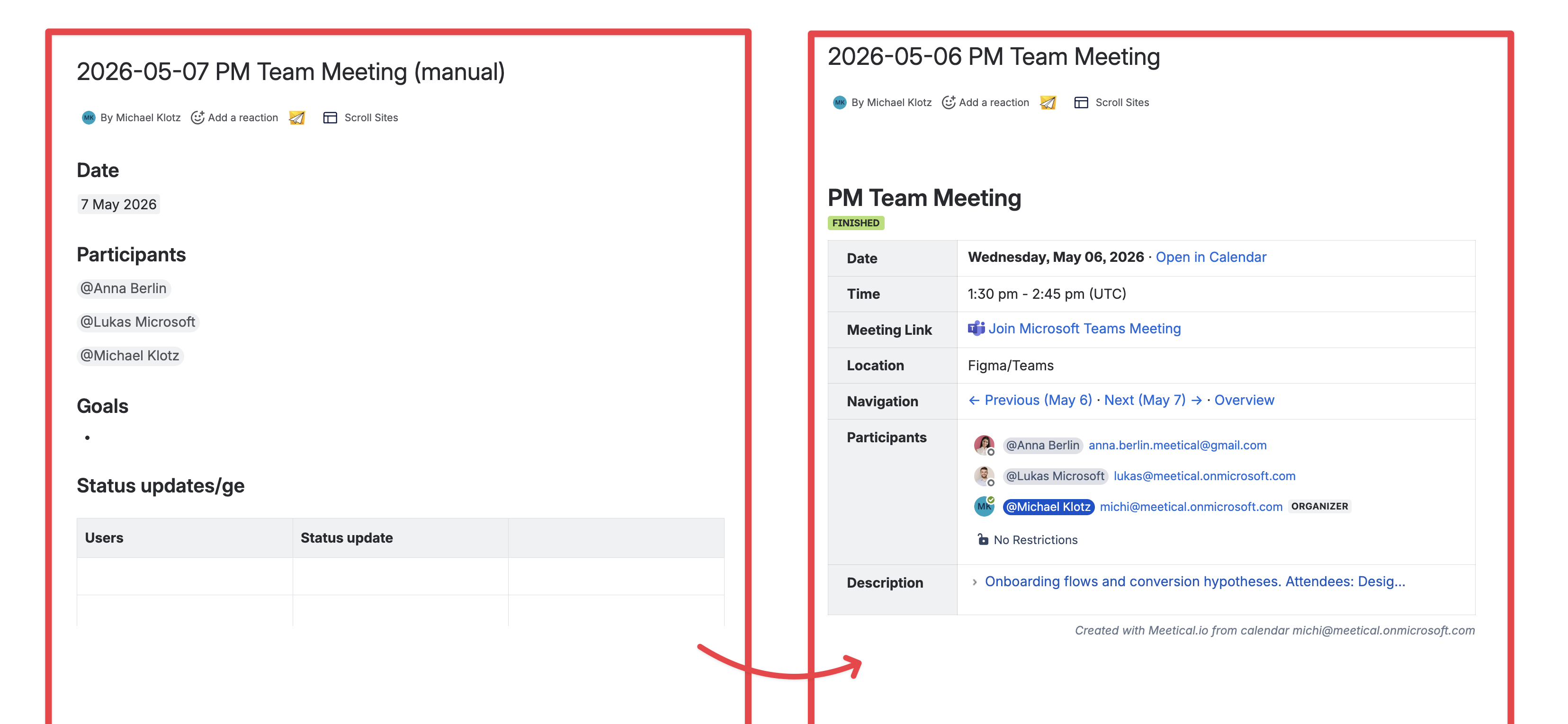
Comparison between manually created page and page created with Meetical
Automations for recurring meetings
With Meetical you can automatically create meeting pages for a meeting series.
This will free your mind from repetitive admin tasks and also create the page in the right moment of time.
Find out more about this automation here.
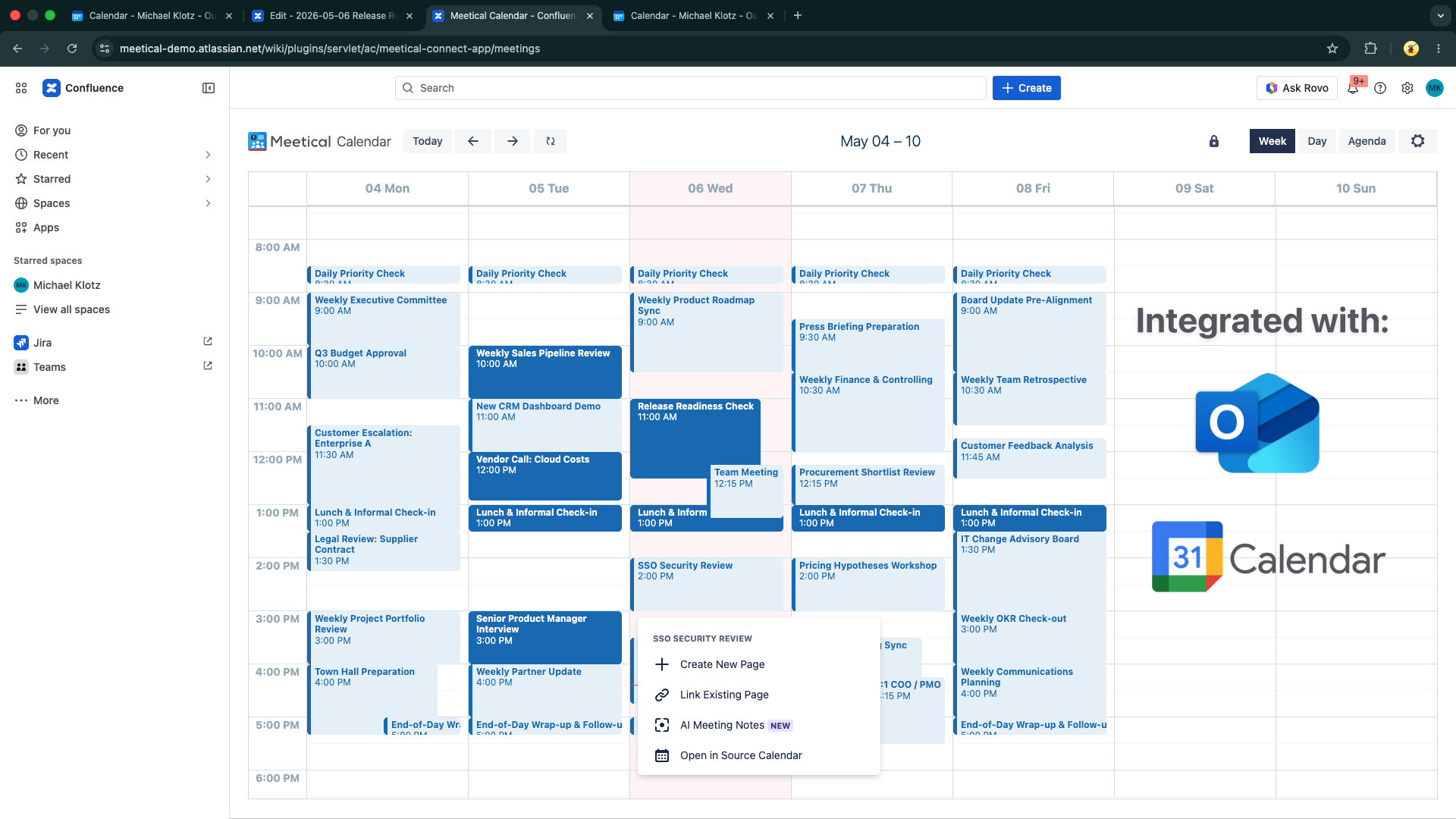
New internal Confluence Calendar
In addition to the calendar extensions, the Meetical app includes this new integrated calendar. The Calendar is connected to your Google Calendar / Outlook Calendar / Microsoft 365
2. Problems with traditional Confluence Meeting Notes
Meetical Meetings solves 3 main problems related to meeting notes in Confluence:
-
Creating meeting notes in Confluence is a manual process. It's time-consuming and gets forgotten. Also, creating a page just-in-time before or even during a meeting takes too much time.
-
The second problem is, as you can see in the video in "my archive,” things get pretty messy, right? So with a manual approach, there is no real consistent naming, and meeting notes are not organized well. Pages get outdated, lost, and abandoned.
-
Third problem: Meeting notes are not linked to the calendar events—or must be manually linked. That’s why they are very hard to find, especially for those who do not yet use Confluence very often.
Creating and managing these meeting pages manually is time-consuming and requires discipline and easily gets forgotten. Meeting pages become outdated, are hard to find, and even get lost.
While Confluence includes a nice meeting notes blueprint and other meeting notes templates, manually creating pages is not scaling well, and when teams get under pressure, this approach might entirely fail.
3. Faster and better Confluence Meeting Notes with the Meetical App
The "Meetical Meetings" app for Atlassian Confluence helps you to find, create, and share meeting notes in Confluence faster and easier!
Meeting pages created and managed with Meetical are
-
Easy to find
-
Easy to create
-
Automatically structured and organized well
Also, Meetical pages are more reliable and more professional: Pages are linked and up-to-date with your calendar events. Meeting notes are complete, great-looking, and ready to share and export.
The basic concept is that every key meeting gets a dedicated Confluence page you can use before, during, and after the meeting. As best practice, these pages get linked to your calendar invites. So everybody can find the page fast and easily.
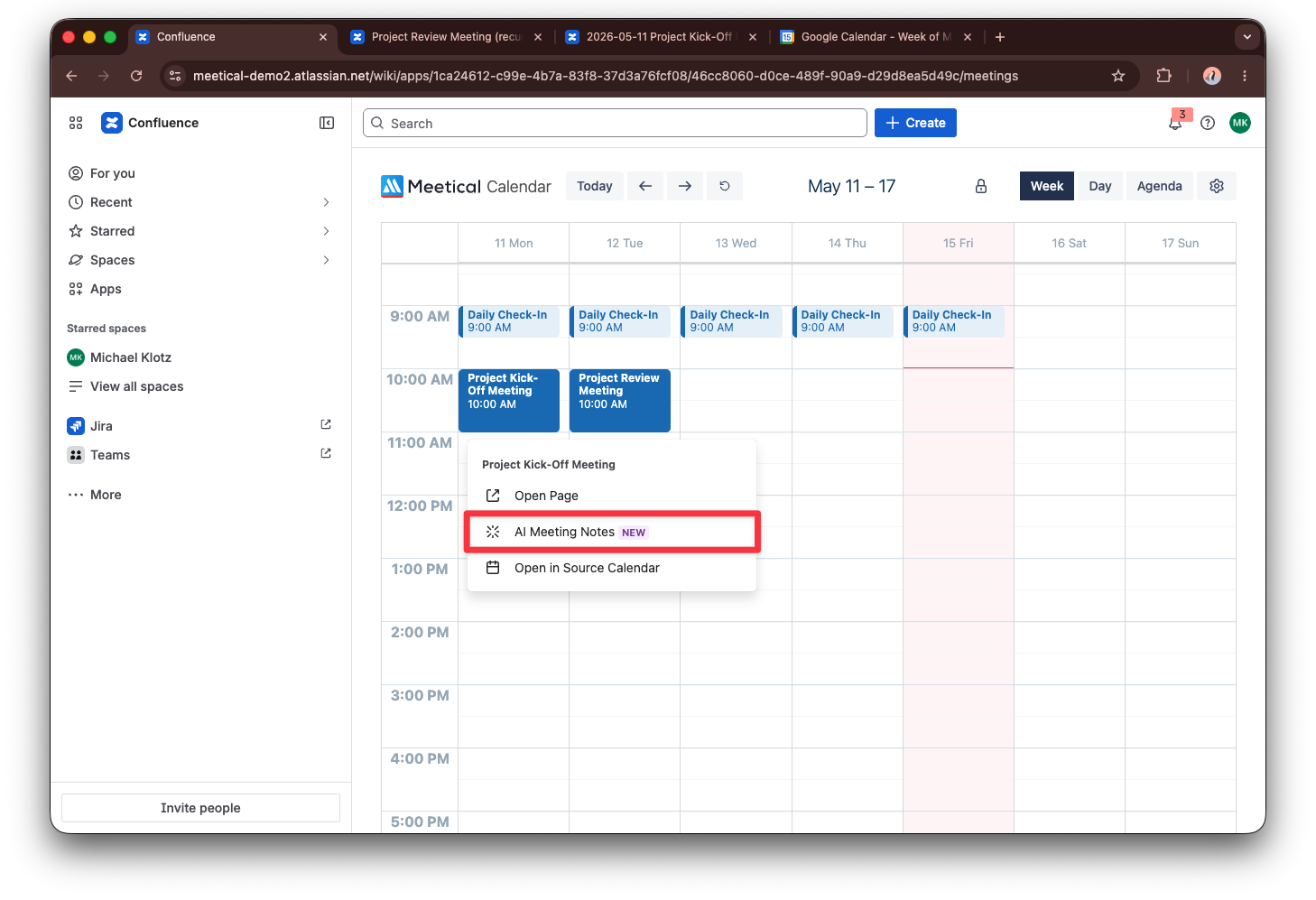
The app allows you to create meeting pages right from your calendar events in seconds and even allows you to automate the process entirely. You can connect both Google Calendar and Microsoft Outlook 365.
The first highlight feature is the new internal Confluence Calendar. You can see all your meetings there.
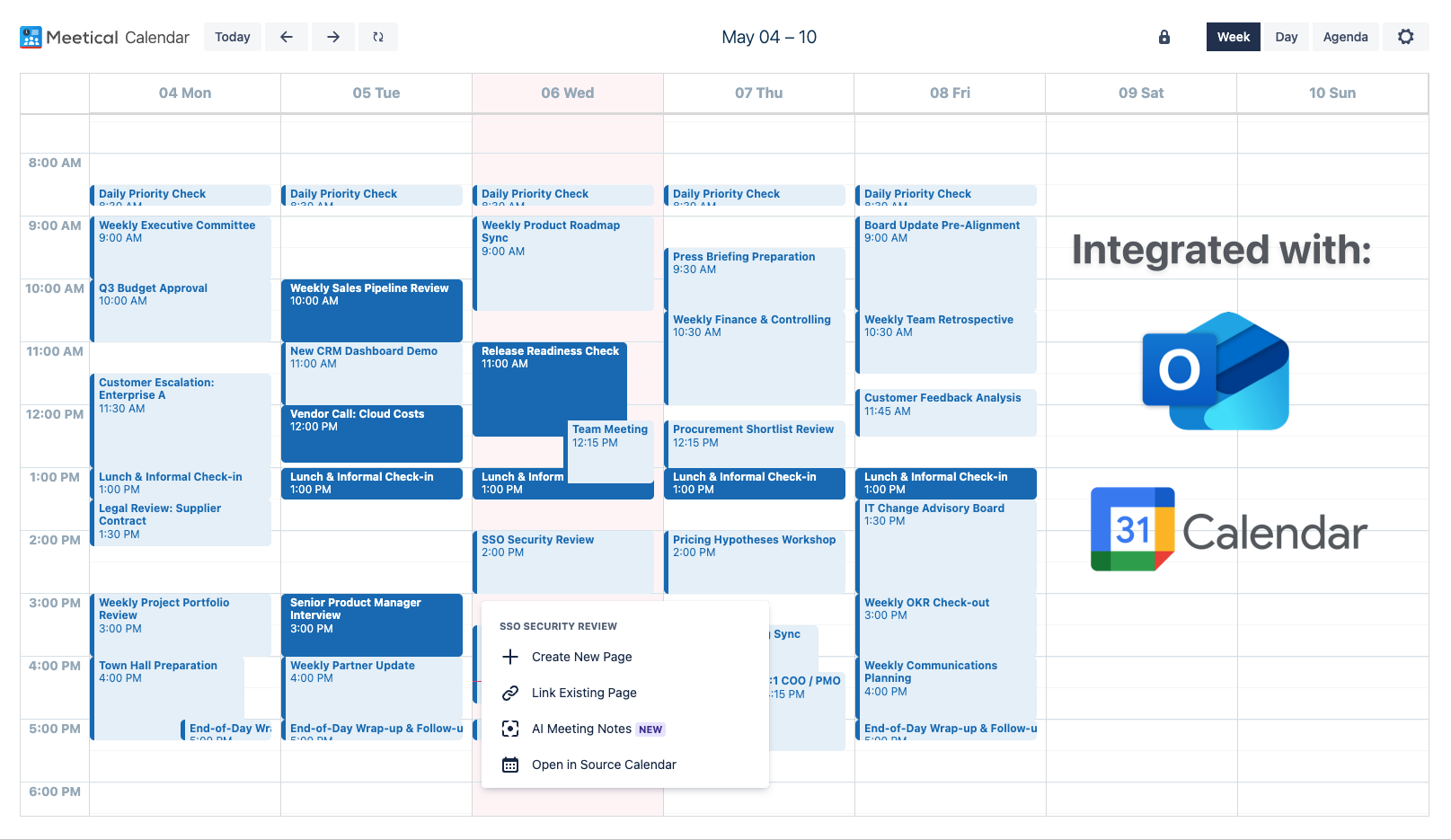
For existing meeting pages, the internal calendar shows a direct link to the page. Additionally, the calendar extensions included in Meetical directly show links in Google Calendar or Outlook Calendar, respectively.
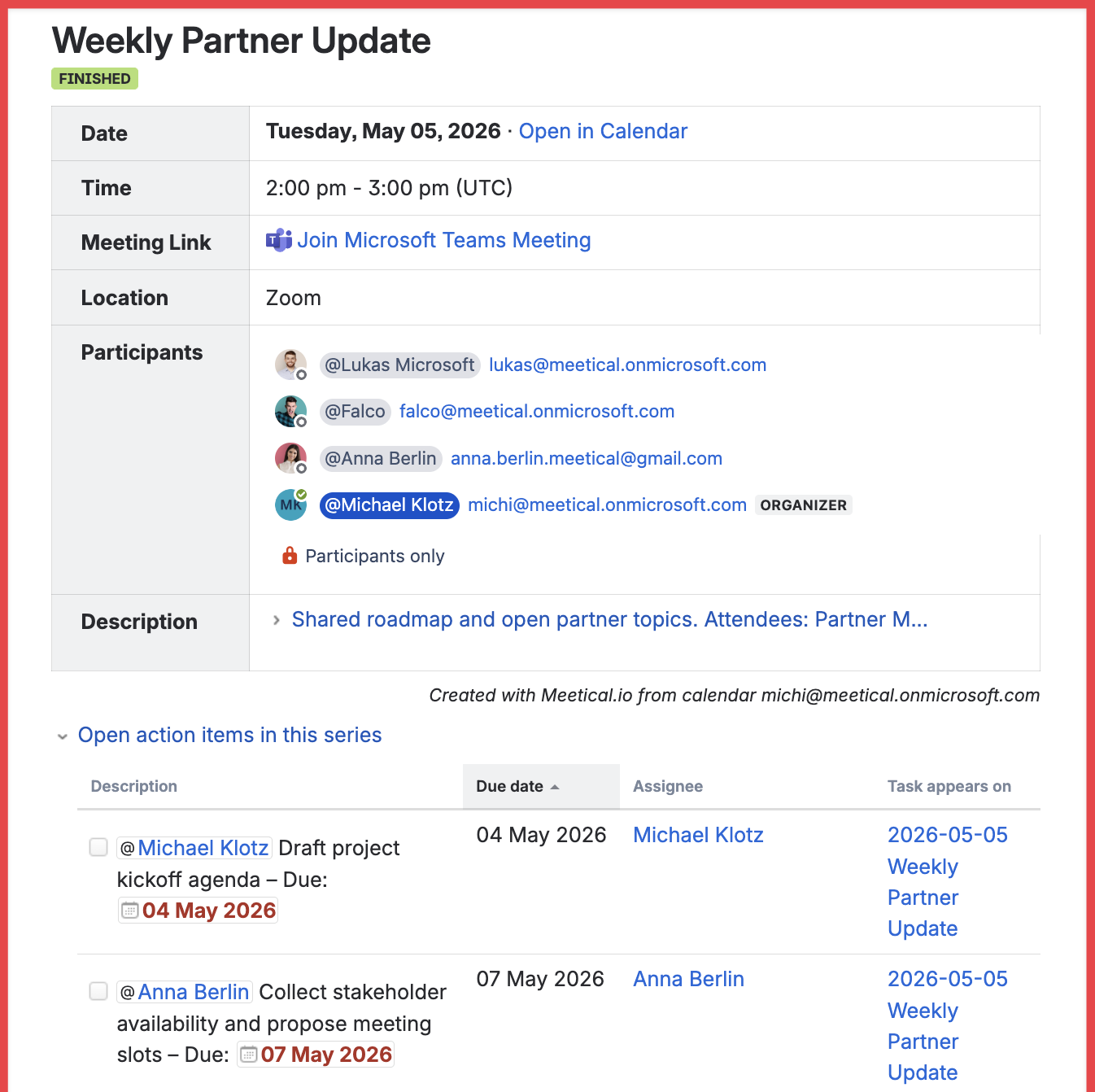
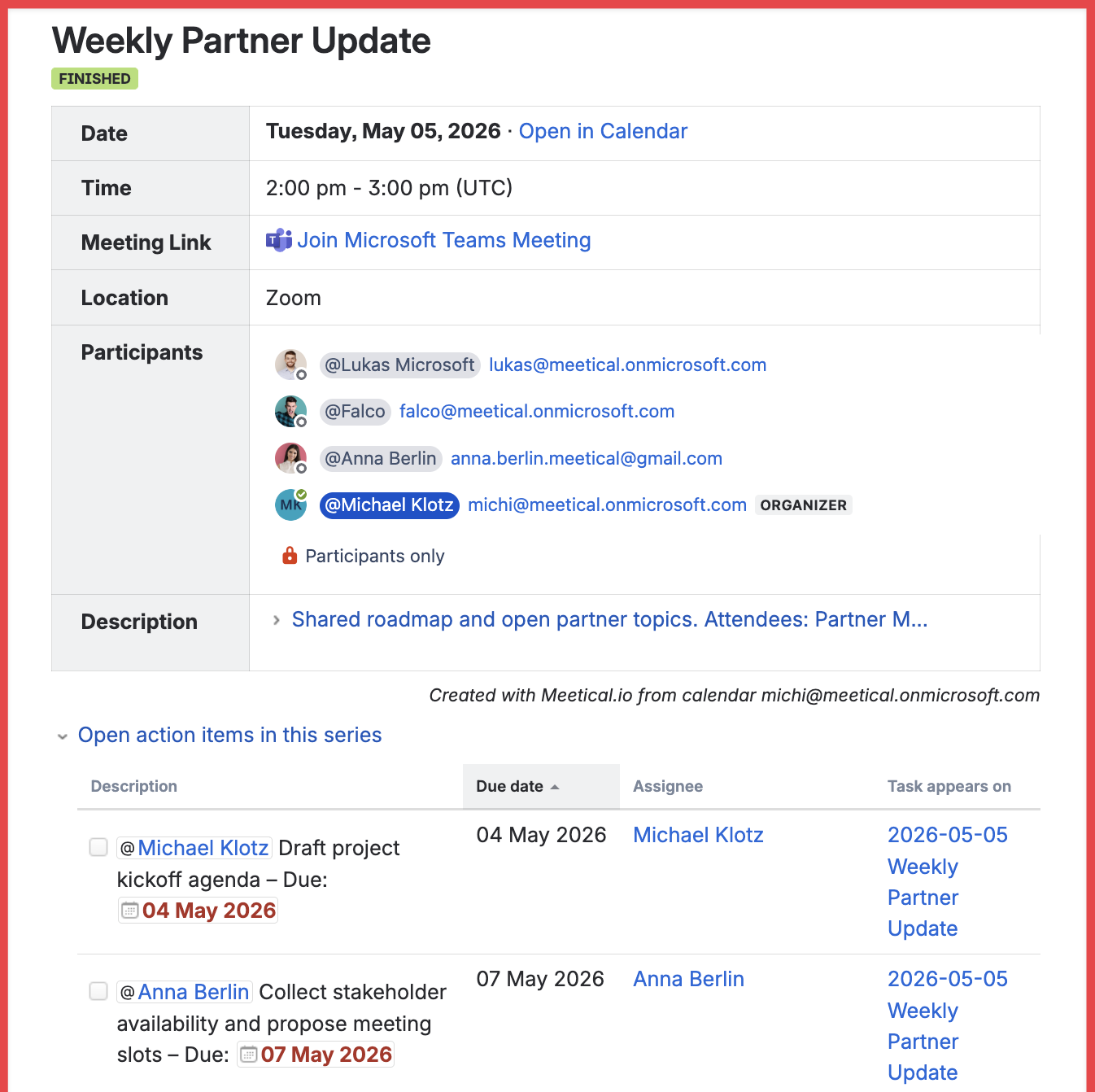
Meetical ships with nice meeting macros for Atlassian Confluence! The most powerful one is the meeting overview macro. It shows the meeting status ("scheduled,” "in-progress,” "finished," or “cancelled”), the date, time, attendees, and the attendees' RSVP status. And everything is automatically kept up-to-date if something changes on the calendar.
For recurring meetings you can see all open tasks in this series as a dropdown under the overview macro on the page:
Like the meeting notes blueprint, Meetical will create additional pages to structure meetings and keep things organized:
-
The app will create a default "Meeting Notes" index page if none exists.
-
Meetical also creates a parent page for recurring meetings.
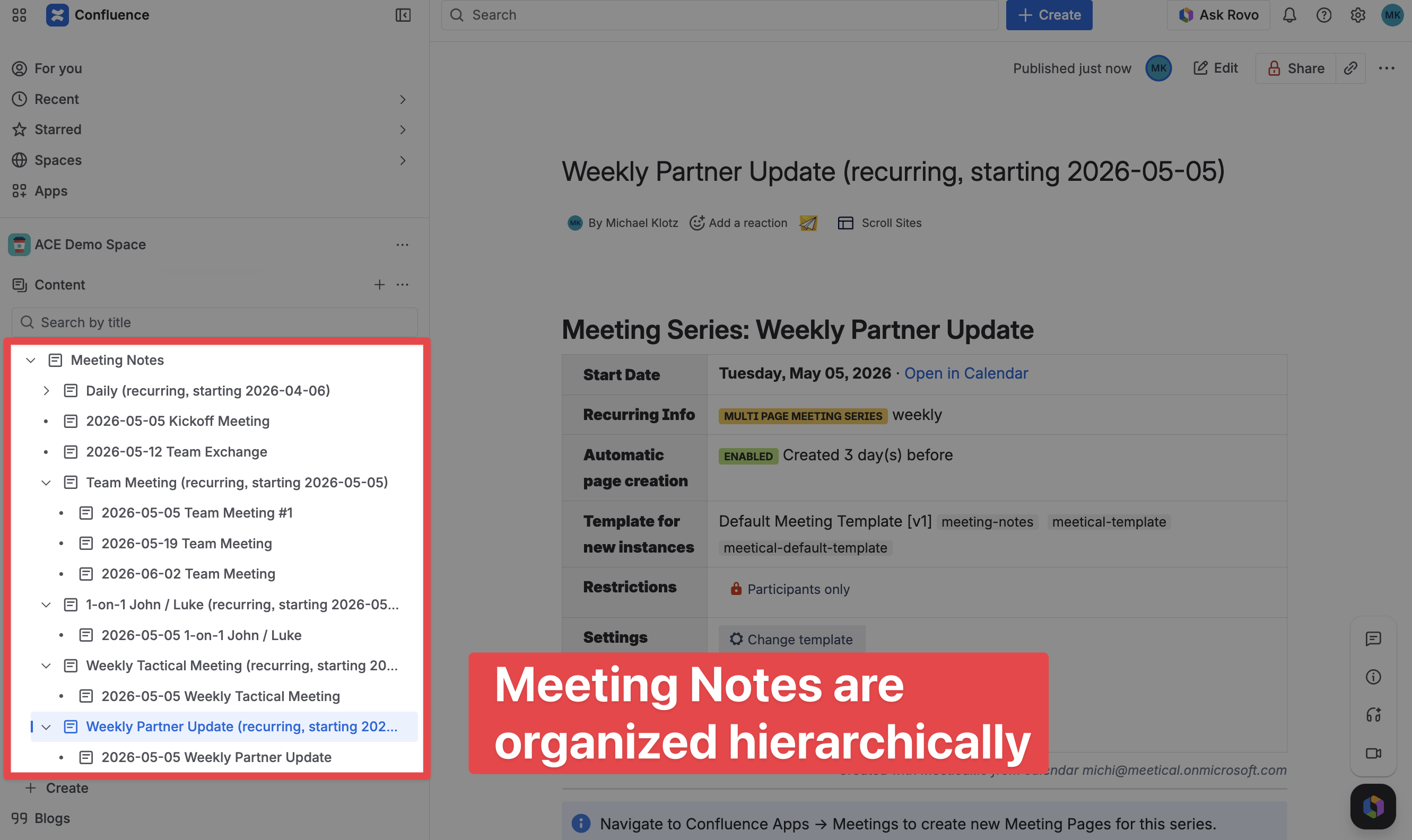
This is how we leverage the power of Confluence to create hierarchies by still keeping things easy to manage.
-
Meetings notes get created under a common parent (customizable)
-
Recurring meetings get grouped automatically under a new parent page.
4. Create new meeting notes pages from your calendar
You have these options to find and create meeting notes in Confluence with Meetical Meetings:
-
Google Calendar: The Meetical Chrome Extension allows you to create Confluence meeting notes directly from your calendar in Chrome and Firefox!
-
Microsoft 365 Outlook Calendar: A Desktop and Web Outlook Add-in for Confluence to create, link, and find meeting pages.
-
New Integrated Confluence Calendar to create and find meeting notes.
The calendar extensions include a link to "Add Confluence Page" right from the event on the calendar.
You can choose your space and from there and use one of the .
The included meeting templates also contain some guidance and inspiration to help you make the most of your meetings. Furthermore, you can even create your own meeting templates!
All pages automatically get populated with essential meeting information like the date, time, location, and description of the meeting invite, including all attendees and their attendance status.
To track attendance, the RSVP status is copied from the calendar by default, but you can even change the attendee's status if the calendar status is not up-to-date. There are even options to generate a dynamic list of participants.
Finally, the Confluence meeting notes page can be used during the meeting to collect action items and decisions. You can add task reports, Jira tasks, Jira task reports, Trello cards, and literally thousands of other additional macros are available on the marketplace to further help to keep projects on track.
5. Automations, meeting templates and other features
The Meetical Meetings App will automatically add a link to the meeting invite; however, this is optional.
Additionally, for recurring meetings, the app remembers the space and templates to be used and creates a page with a single click for new meetings.
But there is more: You are able to completely automate the process for recurring meetings of creating new meeting pages and linking them in the invite description.
We hope you got excited about the app, and if you haven't done so, try it free and discover how Meetical helps your meetings become more effective and productive!
6. Meetical AI: turn meetings into structured notes
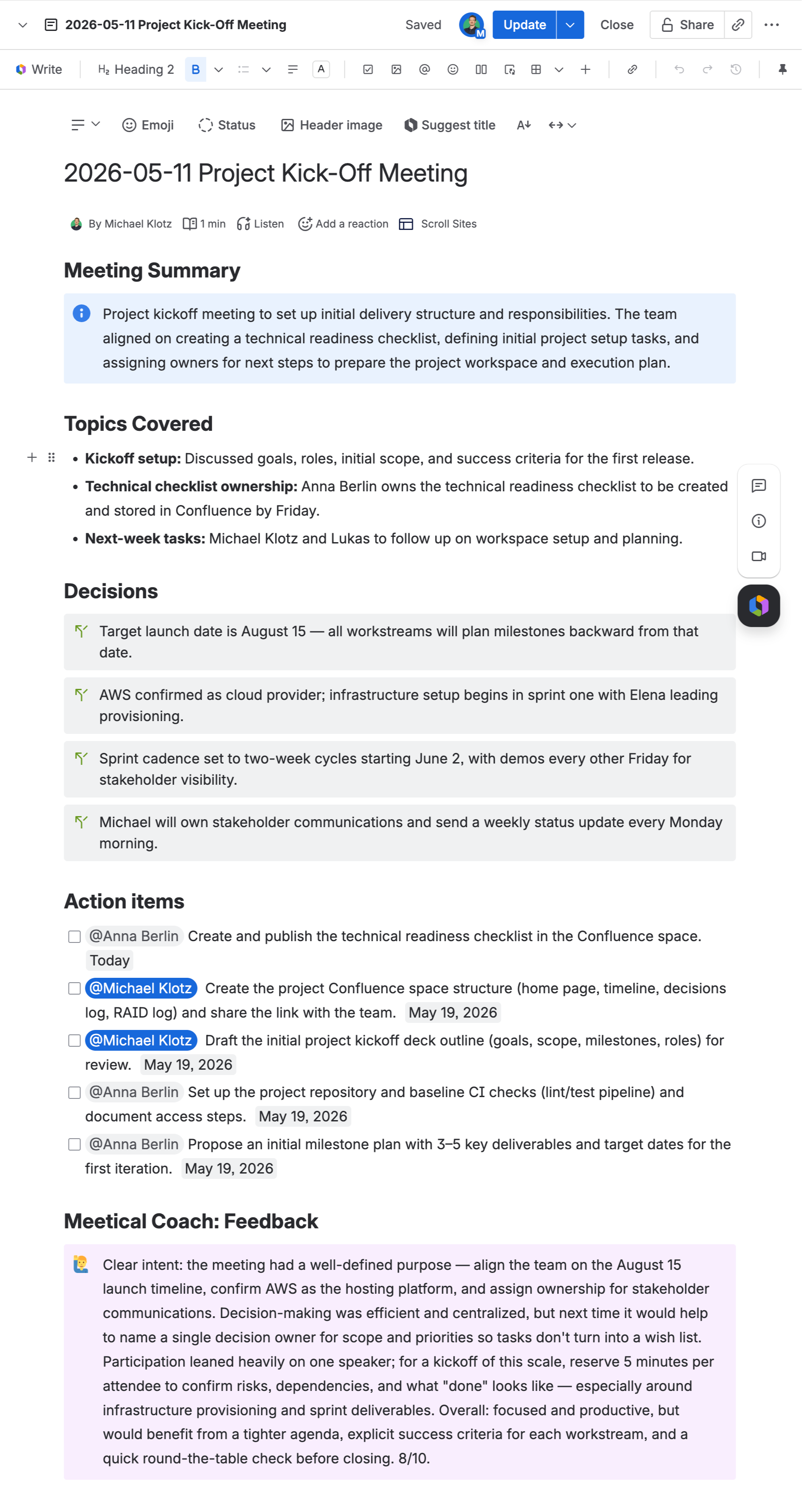
Meetical AI helps teams turn live meetings into structured Confluence notes. It can capture the conversation and create a clear summary, decisions, and action items directly on the connected meeting page.
Use it when you want the meeting page to become the source of truth after the call, without starting from a blank page. Learn more in Generate Notes with Meetical AI.
7. Keep action items visible with Task Reports
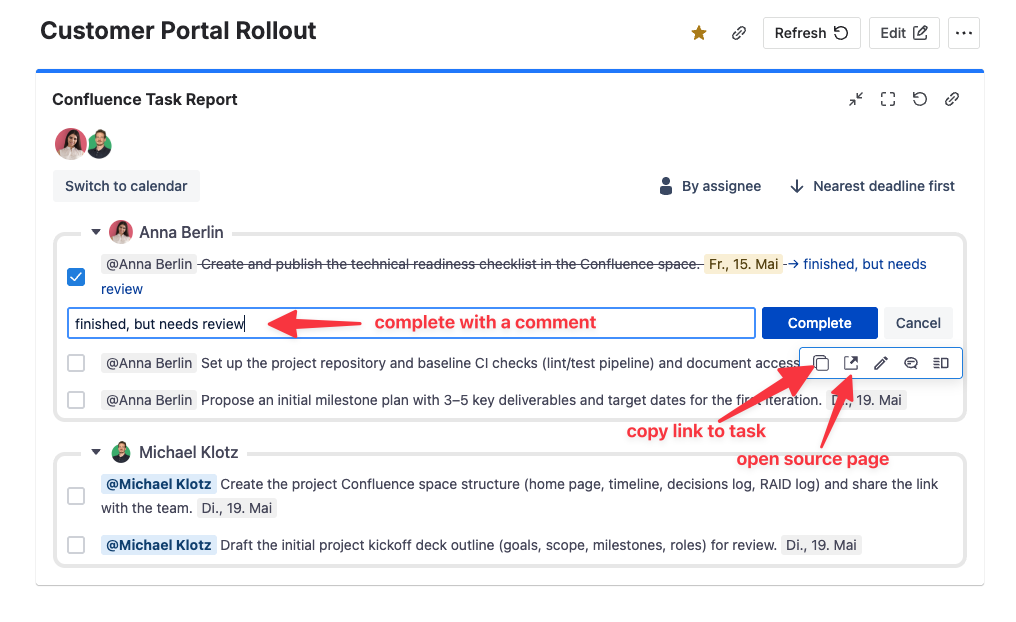
Task Reports help teams follow up on Confluence action items from meeting notes. You can show open tasks on Jira dashboards or inside Confluence, so owners, due dates, and follow-ups stay visible after the meeting.
For recurring meetings, the Open tasks in this series report shows incomplete tasks from the current meeting series in one place. This makes carry-over action items easy to review without opening every meeting page.
Documentation Overview
-
Introduction to Confluence Meeting Notes with Meetical