
Meetical pages can be created from any calendar event or meeting series.
-
The Meetical Calendar in Confluence is the main Meetical experience and offers the most complete set of features.
-
If you prefer to stay in your own calendar, use the Outlook Add-in or the Chrome Extension for Google Calendar. They let you create pages and manage series settings directly from Outlook or Google Calendar.
Open the Meetical Calendar
In Confluence, go to Apps → Meetical Calendar. If you have not connected your calendar yet, follow the First Time Setup.
Your calendar stays private: only the meetings you create or link pages for are shared in Confluence with your colleagues.
The Meetical Calendar has three tabs: Calendar, Agenda settings and AI notes settings.
Calendar
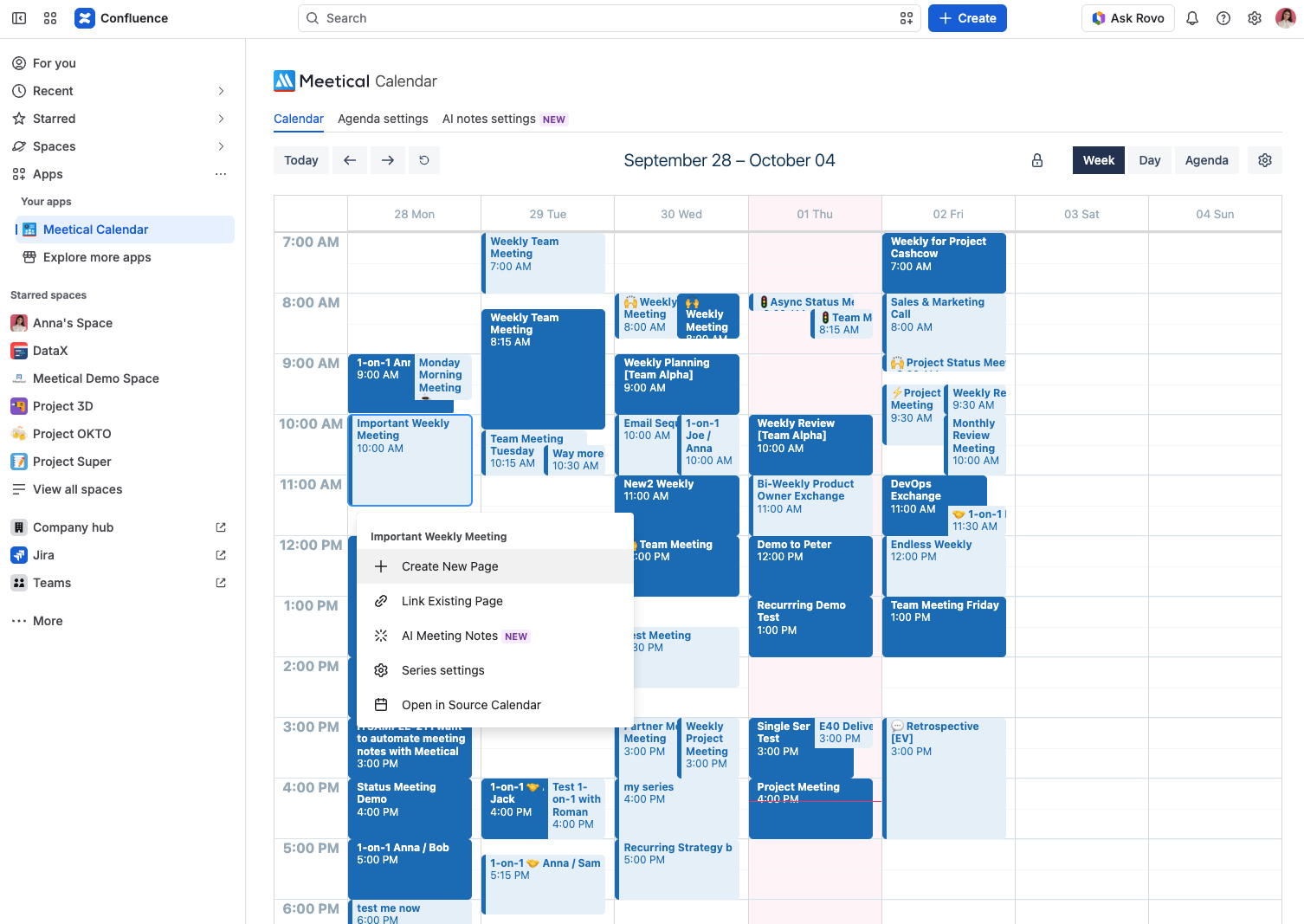
Switch between the Week, Day and Agenda view. Meetical remembers the view you used last. Use Prev and Next to move through your calendar and Refresh to reload it.
Click a meeting to see what you can do with it. The options depend on the meeting, for example Open Page only appears once a page exists:
|
Option |
What it does |
|---|---|
|
Create New Page |
Creates a Confluence page for the meeting, or for the whole series. See Create your first Page. |
|
Open Page |
Opens the meeting page that already exists. |
|
Link Existing Page |
Connects the meeting to a page you already have. See Link calendar events to an existing Confluence Page. |
|
AI Meeting Notes |
Deprecated, use the Meetical panel. |
|
Series settings |
For recurring meetings: automation, agenda template and AI notes of the whole series. The menu shows whether automation is on or off. See How to configure the automation settings. |
|
Open Series Master Page |
Opens the parent page of the meeting series. |
|
Open in Source Calendar |
Opens the meeting in Google Calendar or Outlook. |
The menu in the calendar toolbar leads to your Meetical Configuration, the Documentation and Get support.
Agenda settings: defaults for new pages
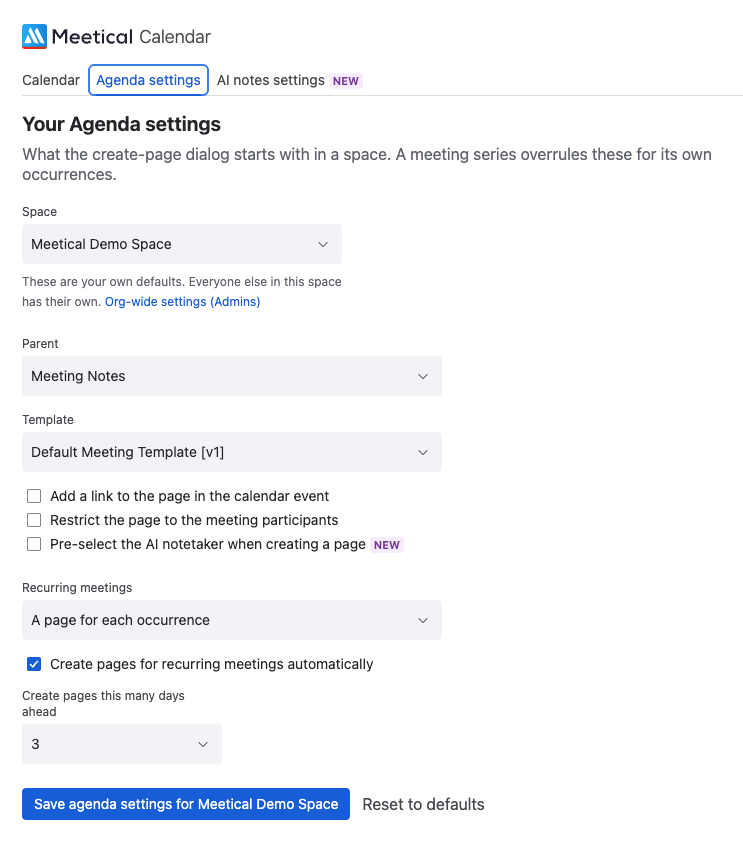
Here you set how new meeting pages are created. Settings are per space: choose a space first.
-
Parent and Template: where new pages go and which template they use.
-
Recurring meetings: create pages for recurring meetings automatically, and how many days ahead.
-
Add a link to the page in the calendar event, so participants find the page from the invite.
-
Restrict the page to the meeting participants.
Changes are saved automatically.
AI notes settings
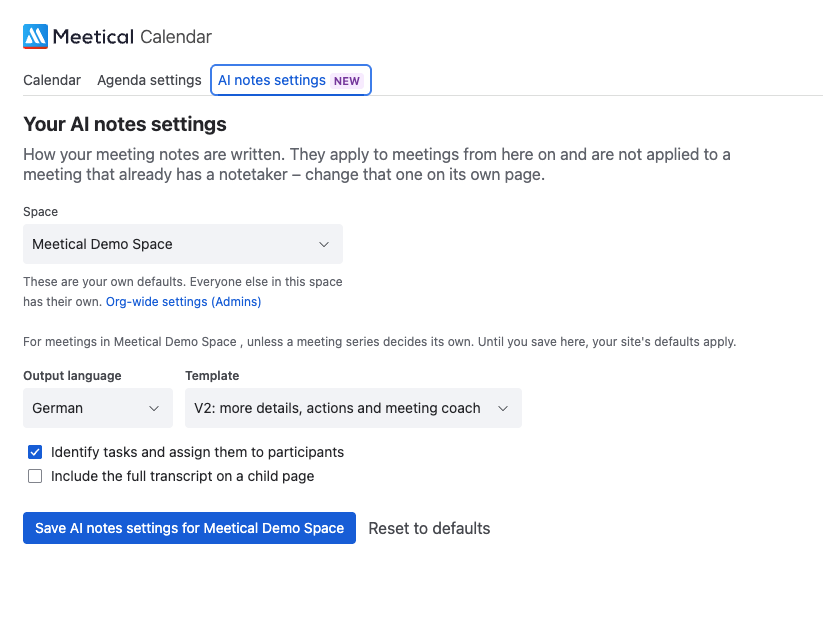
Here you set how the AI notetaker writes notes for your meetings, again per space.
-
Output language: the language of the notes, independent of the language spoken in the meeting.
-
Template: the structure of the notes.
-
Identify tasks and assign them to participants: turns action items into Confluence tasks.
-
Include the full transcript on a child page.
If the tab says Meetical AI is not enabled for your account, ask a Confluence admin to enable Meetical AI for you.
Which setting applies
Your settings are defaults for new pages. The Series settings of a meeting series take priority over them. Confluence admins can also set site-wide defaults, which apply wherever you have not chosen something yourself: the Org-wide settings (Admins) link in both settings tabs leads there. See Meetical Customisation & Administration.
Meetical works with one Confluence site per account. If the calendar says you are connected to another site, your account is already in use on a different Confluence site.