
Meetical AI writes the notes of a meeting automatically. You can generate them again at any time, for example in another language or with a different template.
Generate the notes again
-
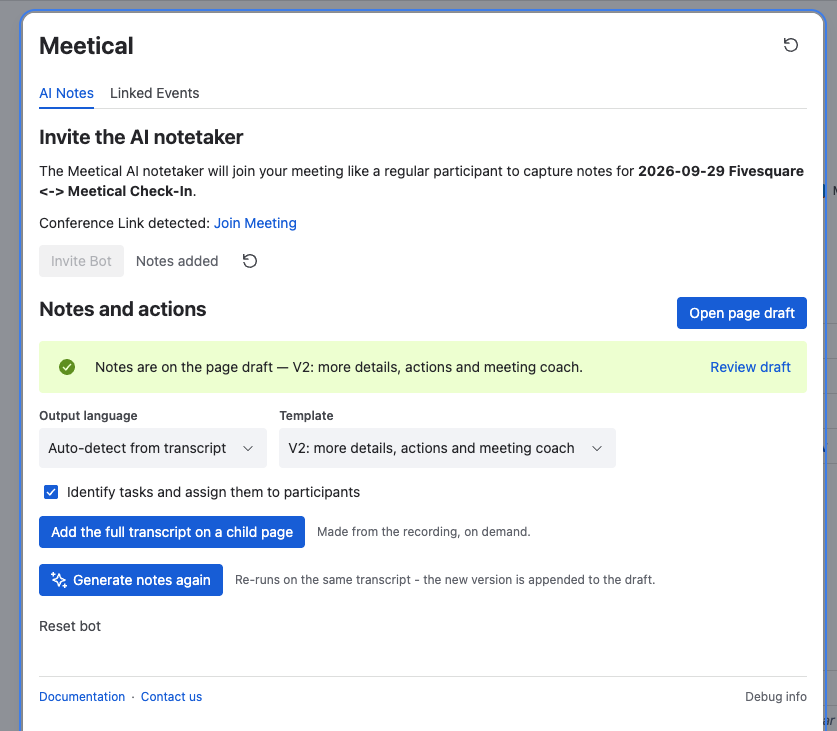
Open the meeting page. In the row below the page title, click Meetical and open the AI Notes tab.
-
Change the note settings:
-
Output language: the language of the notes, independent of the language spoken in the meeting.
-
Template: the structure of the notes.
-
Identify tasks and assign them to participants: turns action items into Confluence tasks.
-
Include the full transcript on a child page.
-
-
Click Generate notes again.
-
When the notes are ready, the tab says Notes are on the page draft. Open the draft, review the notes and publish the page.
Good to know
-
Only the person who invited the notetaker can generate the notes again. If a colleague invited it, you see the notetaker read-only.
-
Nothing else on the page is replaced: your agenda and your own notes stay in place.
-
On a Live Page there is no draft: the notes appear on the page directly.
Change the settings for future meetings
-
For every meeting of a series: open the Series Settings of the series in the Meetical Calendar and use the AI Notes tab. See All Meetical Automation Options explained.
-
For your own new pages: use the AI notes settings tab in the Meetical Calendar.