
Meetical includes ready-to-use meeting templates for common meeting types. Use them as a starting point, then customize the agenda, macros, and follow-up sections for your team.
The meeting templates contain ready-to-use blueprints for your team meetings, tactical meetings, strategy meetings, one-on-one meetings, and much more.
Credits for these templates and for inspiration go to our amazing customers, feedback from our network, and many books, including Death by Meeting, The Advantage, Sprint, Measure what Matters, and High Output Management.
Learn how to install and customize the included Meetical templates.
How to use a meeting template
When you create a meeting page with Meetical, select the template that best matches the meeting type. You can use the template as-is or edit it later in Confluence to match your team workflow.
Included meeting templates
1. Default Meetical Template
Best for: General team meetings, customer syncs, and one-off project meetings.
Meeting template with result-focused agenda, action items, decisions, and meeting overview macro.
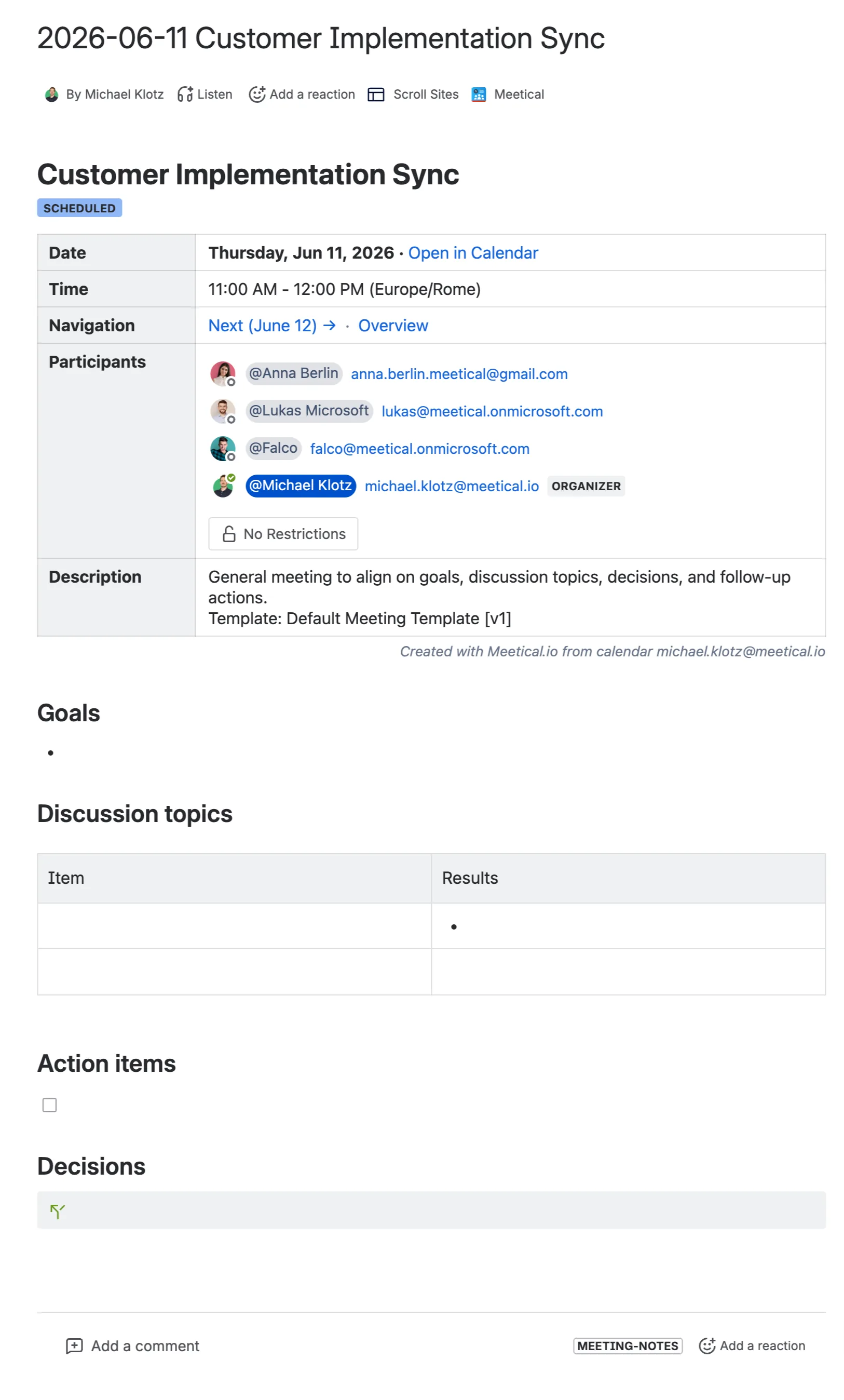
The Default Meetical Template starts with the meeting overview macro, containing all essential meeting information like date, time, location, and participants.
This meeting template has a result-focused agenda and consists of
-
Overview - date, time, location, participants, description
-
Goals
-
Discussion topics
-
Action items
-
Decisions
2. Team Update Meeting Template
Best for: Weekly team updates, sales or project pipeline reviews, and recurring team reporting.
A team update meeting to update each other on current work, track action items, and record recent highlights.
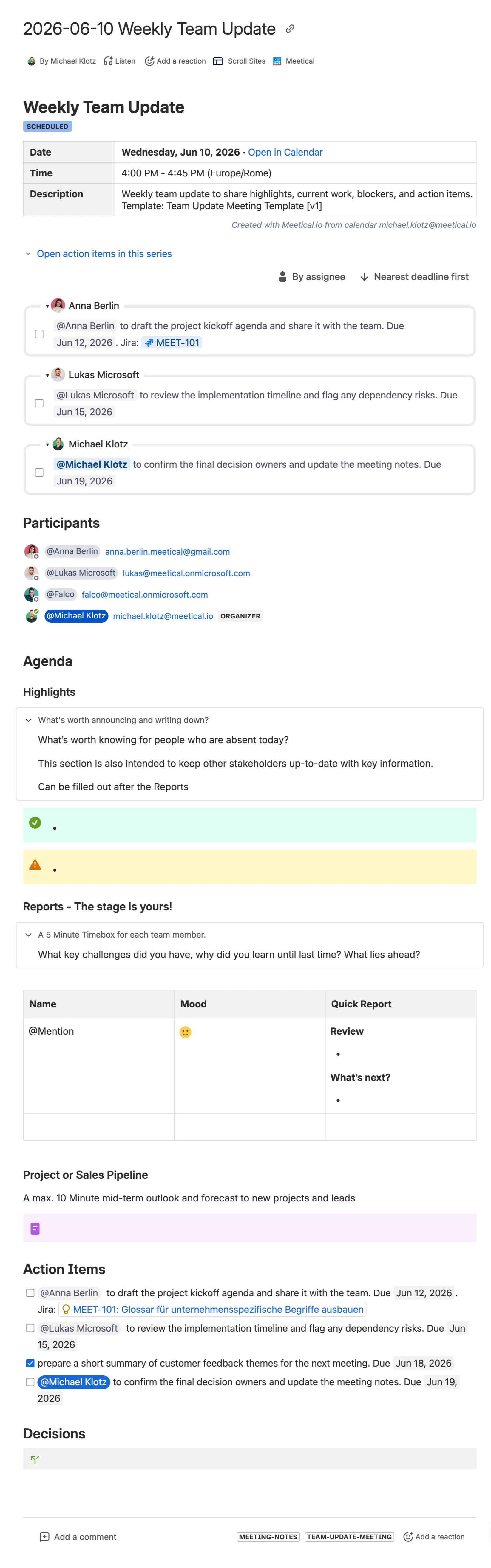
The Team Update Meeting starts with the meeting overview macro, containing all essential meeting information like date, time, location, and participants.
This meeting template is focused on getting everyone up-to-date with the status of projects and actions and contains:
-
Overview - date, time, location, participants, description
-
Agenda
-
Highlights
-
What's worth announcing and writing down?
-
What’s worth knowing for people who are absent today?
-
This section is also intended to keep other stakeholders up-to-date with key information
-
Can be filled out after the Reports
-
-
-
Reports – The stage is yours!
-
A 5-minute timebox for each team member.
-
What key challenges did you have? Why did you learn until the last time? What lies ahead?
-
-
-
Project or Sales Pipeline
-
A max. 10-minute mid-term outlook and forecast to new projects and leads
-
Notes
-
-
-
Action Items
-
Decisions
3. One-on-one Meeting Template
Best for: Manager check-ins, coaching sessions, and recurring individual feedback meetings.
A feedback meeting template for a 1-on-1 between managers and direct reports. This regular check-in helps to maintain a good relationship, discuss recent performance, and evaluate short-term goals.
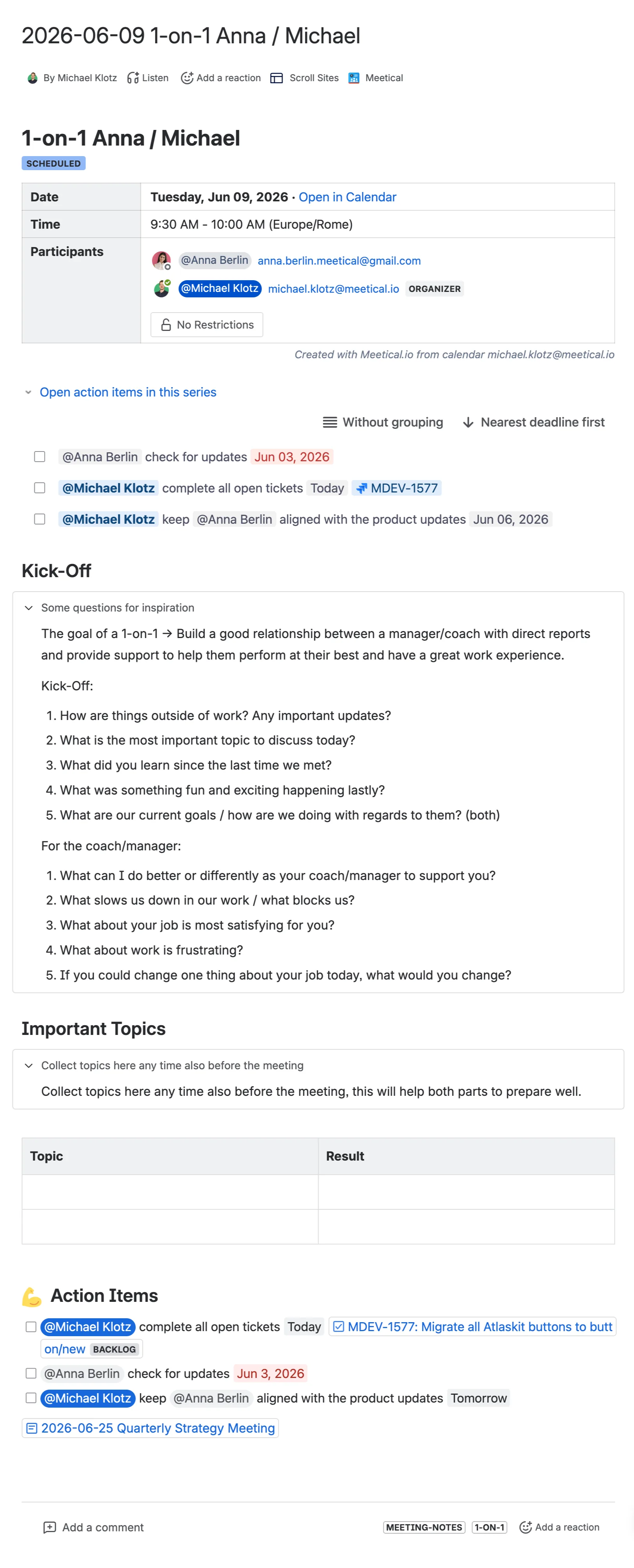
The One-on-One Meeting Template starts with the meeting overview macro, containing all essential meeting information like date, time, location, and participants.
This meeting template is ideal for regular check-ins between employees and superiors and contains:
-
Overview - date, time, location, participants, description
-
Kickoff
-
Some questions for inspiration—The goal of a 1-on-1 → Build a good relationship between a manager/coach with direct reports and provide support to help them perform at their best and have a great work experience.
-
Kickoff
-
What is the most important topic to discuss today?
-
What did you learn since the last time we met?
-
What were some fun and exciting happening lately?exciting things
-
What are our current goals / how are we doing with regards to them? (both)
-
-
For the coach/manager:
-
What can I do better or differently as your coach/manager to support you?
-
What slows us down in our work / what blocks us?
-
What about your job is most satisfying for you?
-
What about work is frustrating?
-
If you could change one thing about your job today, what would you change?
-
-
-
Important Topics
-
Collect topics here any time also before the meeting
-
Collect topics here any time, also before the meeting; this will help both parts to prepare well.
-
-
Topics & Results
-
-
Action Items
4. Weekly Tactical Meeting
Best for: Weekly tactical meetings, operations syncs, and recurring execution reviews.
A tactical meeting for teams and departments starting with a lightning round, a progress review, and a collaborative, dynamic agenda.
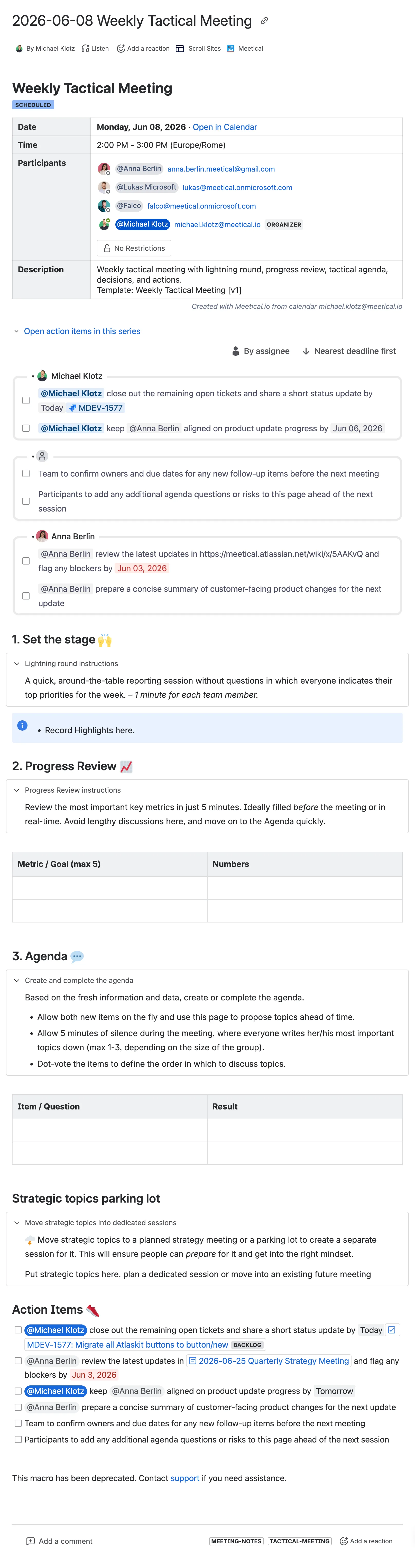
The Weekly Tactical Meeting starts with the meeting overview macro, containing all essential meeting information like date, time, location, and participants.
This meeting template is ideal for big meetings between teams and departments and contains the following:
-
Overview - date, time, location, participants, description
-
Set the stage
-
Lightning round instructions
-
A quick, around-the-table reporting session without questions in which everyone indicates their top priorities for the week. – 1 minute for each team member.
-
-
Highlights
-
-
Progress Review
-
Progress Review Instructions
-
Review the most important key metrics in just 5 minutes. Ideally filled before the meeting or in real-time. Avoid lengthy discussions here and move on to the agenda quickly.
-
-
-
Agenda
-
Create and complete the agenda
-
Based on the fresh information and data, create or complete the agenda.
-
Allow both new items on the fly and use this page to propose topics ahead of time.
-
Allow 5 minutes of silence during the meeting, where everyone writes her/his most important topics down (max 1-3, depending on the size of the group).
-
Dot-vote the items to define the order in which to discuss topics.
-
-
Questions & Results
-
-
Strategic topics parking lot
-
Move strategic topics into dedicated sessions
-
Move strategic topics to a planned strategy meeting or a parking lot to create a separate session for it. This will ensure people can prepare for it and get into the right mindset.
-
Put strategic topics here; plan a dedicated session or move into an existing future meeting
-
-
-
-
Action Items
-
Feedback on meeting effectiveness
5. Strategy Meeting Template
Best for: Quarterly planning, strategy workshops, and leadership alignment sessions.
Strategy meetings help reinforce bigger goals for the organisation. Help departments feel accountable for progress. Engage and align everybody on your team and make informed decisions.
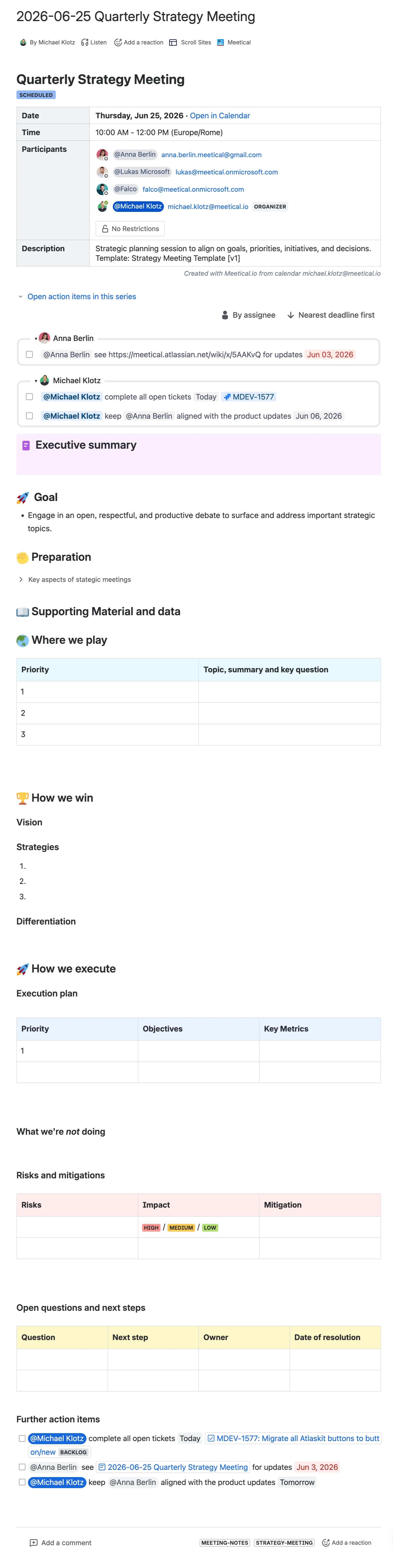
The Strategy Meeting Template starts with the meeting overview macro, containing all essential meeting information like date, time, location, and participants.
This meeting template is focused on the bigger goals of an organization and contains
-
Overview - date, time, location, participants, description
-
Executive Summary
-
Goal
-
Engage in an open, respectful, and productive debate to surface and address important strategic topics.
-
-
Preparation
-
Key aspects of strategic meetings
-
A strategic meeting success is determined from these key aspects:
-
Define the topics and questions as clearly as possible beforehand.
-
Make sure participants have enough time to prepare.
-
Don't wait for the meeting to start thinking, but if you did... Request or schedule a 10-minute silence session where participants gather data and read supporting material.
-
-
-
-
Supporting Material and data
-
Where we play—Topics, summary and key questions based on priority
-
How we win
-
Vision
-
Strategies
-
Differentiation
-
-
How we execute
-
Execution plan – Key Metrics and Objectives based on priority
-
What we’re not doing
-
Risks and mitigations – based on impact
-
Open questions and next steps
-
Further action items
-
6. Executive Meeting Template
Best for: Leadership reviews, portfolio updates, and management meetings.
A meeting template for executive teams and those who want to track projects and initiatives.
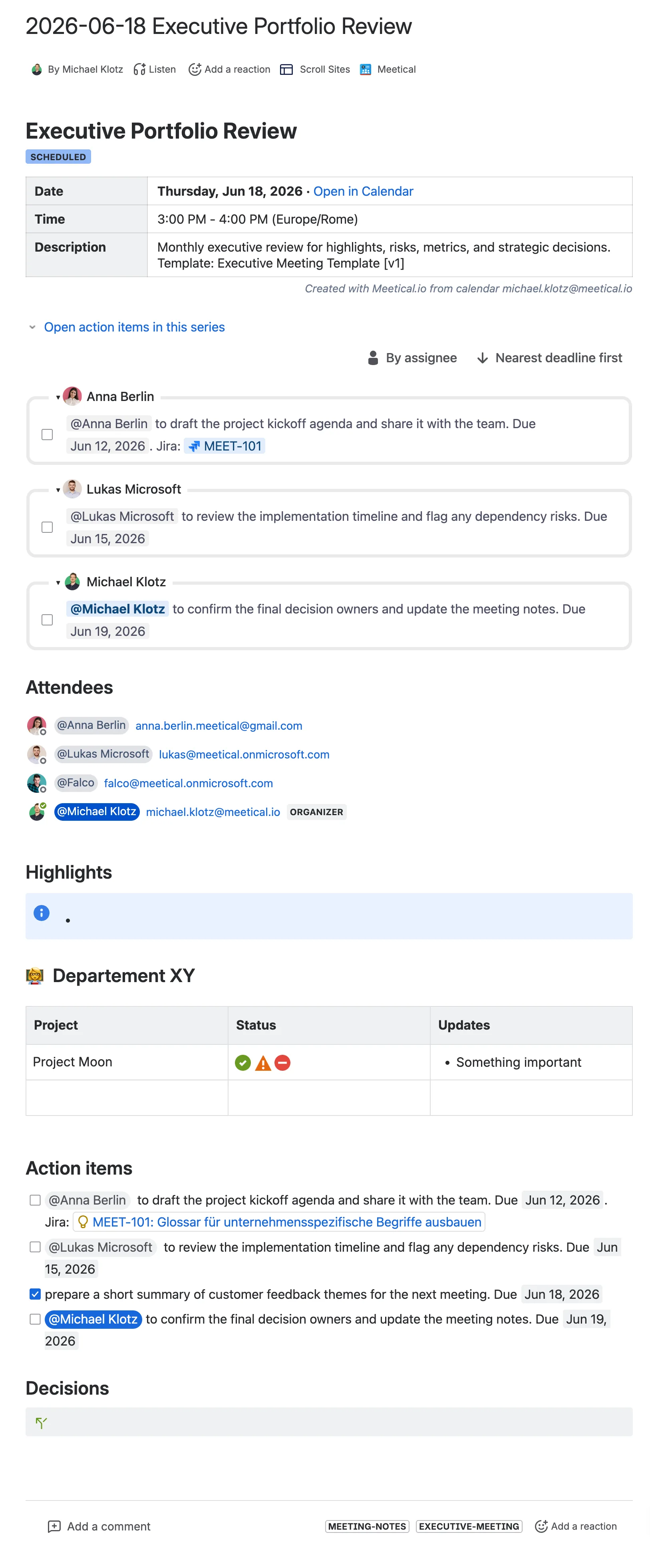
The Executive Meeting Template starts with the meeting overview macro, containing all essential meeting information like date, time, location, and participants.
This meeting template is ideal for executive teams tracking projects and initiatives and contains:
-
Overview - date, time, location, participants, description
-
Highlights
-
Meeting Macros (such as Meetical Macros or Jira Reports)
-
Department Notes including Project, Status, Updates
-
Action Items
-
Decisions
7. Project Kickoff
Best for: Project kickoffs, customer onboarding projects, and new internal initiatives.
A project kickoff template for starting a new project with shared context, clear responsibilities, and visible follow-up work.
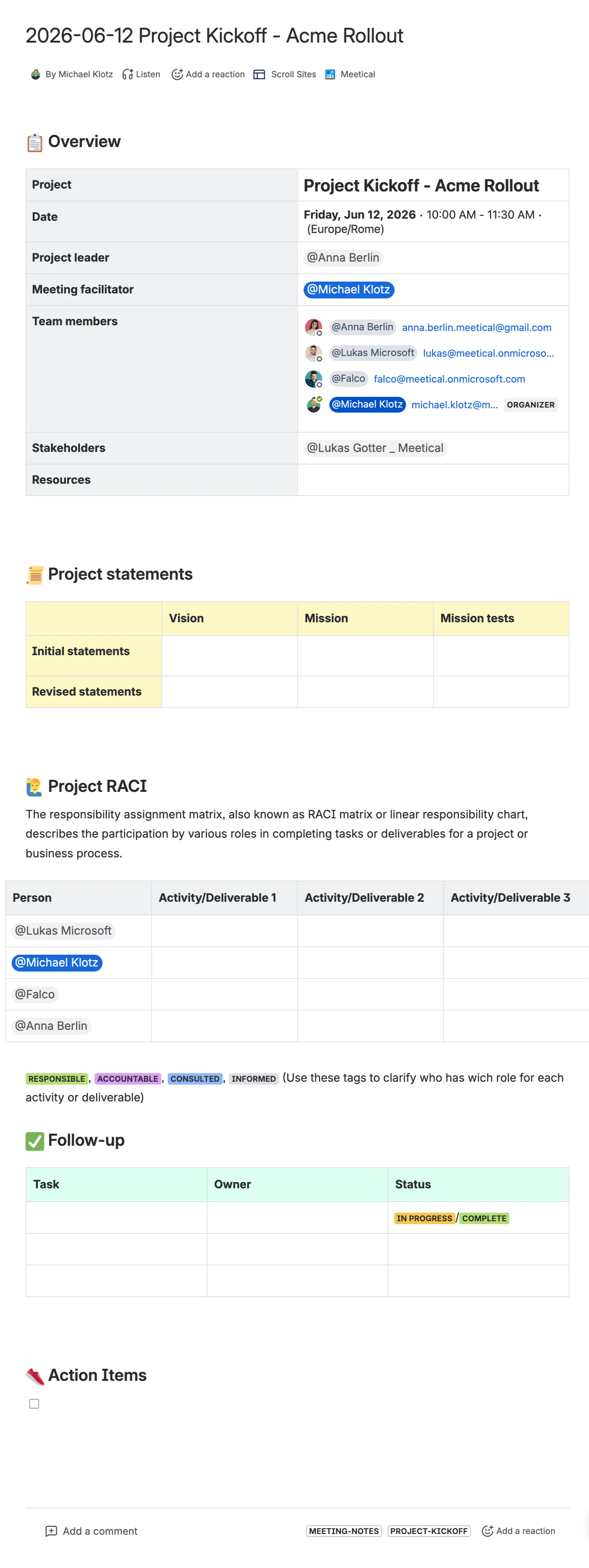
The Project Kickoff template starts with the meeting overview macro, containing all essential meeting information like date, time, location, and participants.
This meeting template is focused on aligning the team before project work begins and contains:
-
Overview - date, time, location, participants, description
-
Project goals and expected outcomes
-
Roles and responsibilities
-
Key activities and deliverables
-
Timeline, risks, and dependencies
-
Follow-up tasks with owners and status
-
Action Items
8. Async Status Meeting
Best for: Distributed teams, async project updates, and lightweight status reporting.
An async status meeting template for teams that want to share updates, decisions, and follow-up tasks without running a full live meeting.
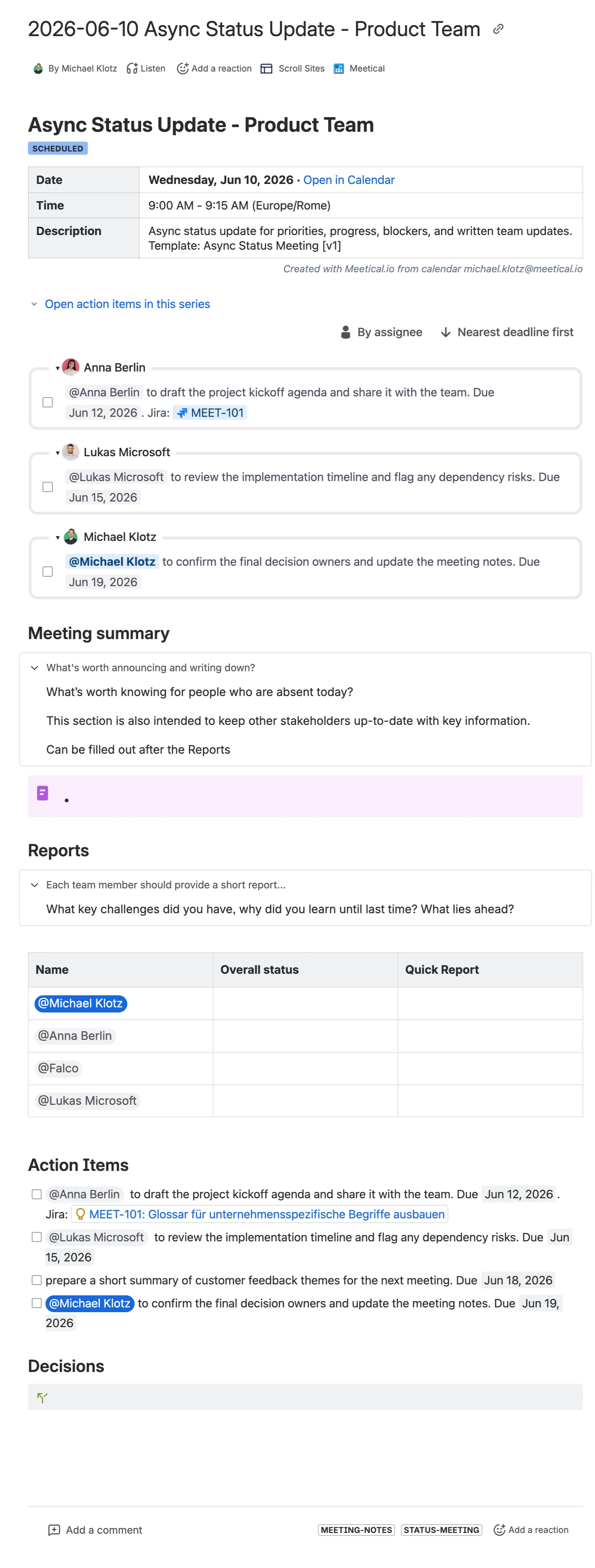
The Async Status Meeting template starts with the meeting overview macro, containing all essential meeting information like date, time, location, and participants.
This meeting template is focused on lightweight asynchronous reporting and contains:
-
Overview - date, time, location, participants, description
-
Meeting summary
-
Reports by participant or team area
-
Overall status
-
Quick report sections
-
Action Items
-
Decisions
9. Daily Standup Meeting
Best for: Daily team syncs, agile standups, and fast operational check-ins.
A daily standup template for short recurring team check-ins around priorities, progress, and blockers.
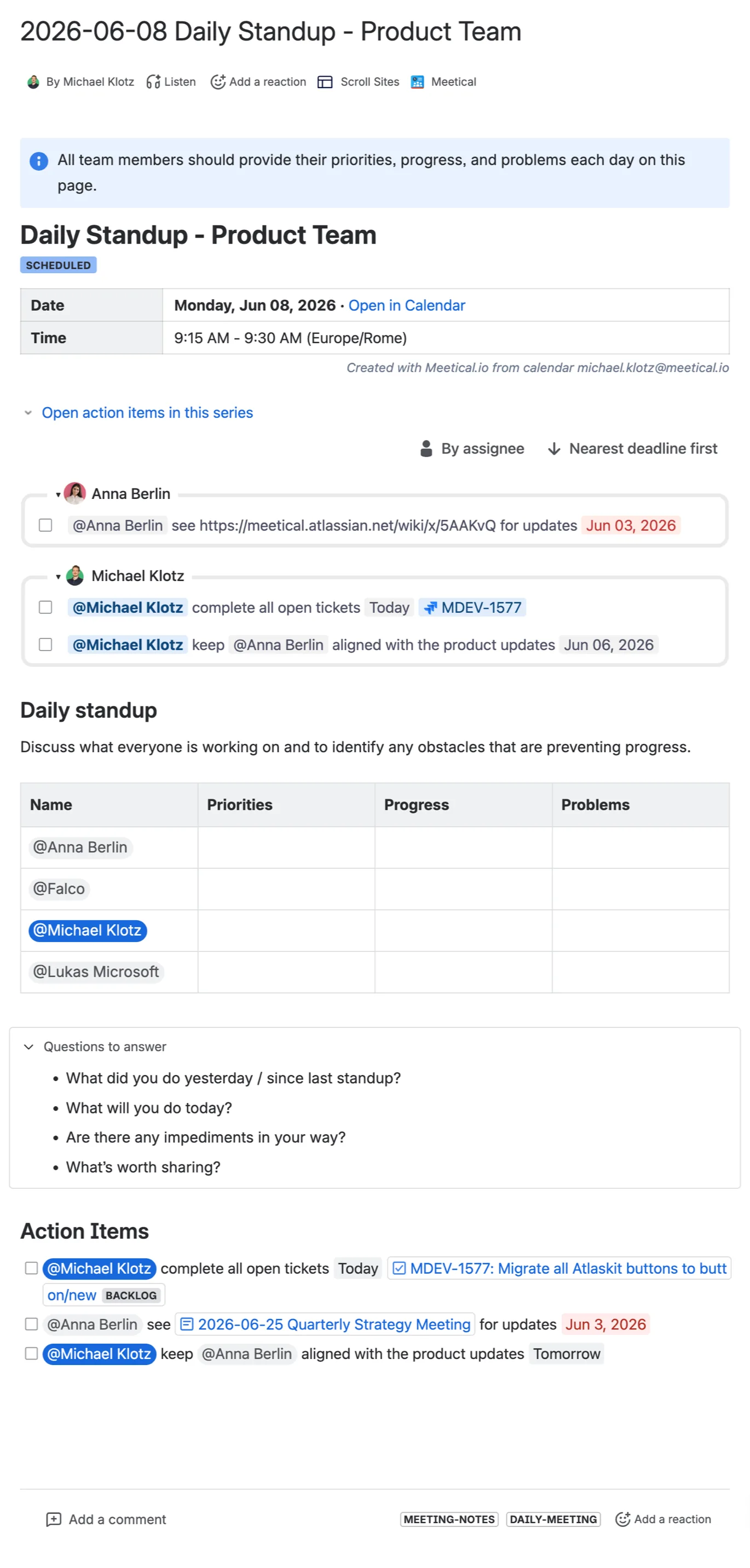
The Daily Standup Meeting template starts with the meeting overview macro, containing all essential meeting information like date, time, location, and participants.
This meeting template is focused on fast operational alignment and contains:
-
Overview - date, time, location, participants, description
-
Daily standup instructions
-
Priorities
-
Progress
-
Problems and blockers
-
Action Items
10. Retrospective
Best for: Sprint retrospectives, project reviews, and continuous improvement meetings.
A retrospective template for teams that want to reflect on recent work, identify improvements, and turn learnings into action items.
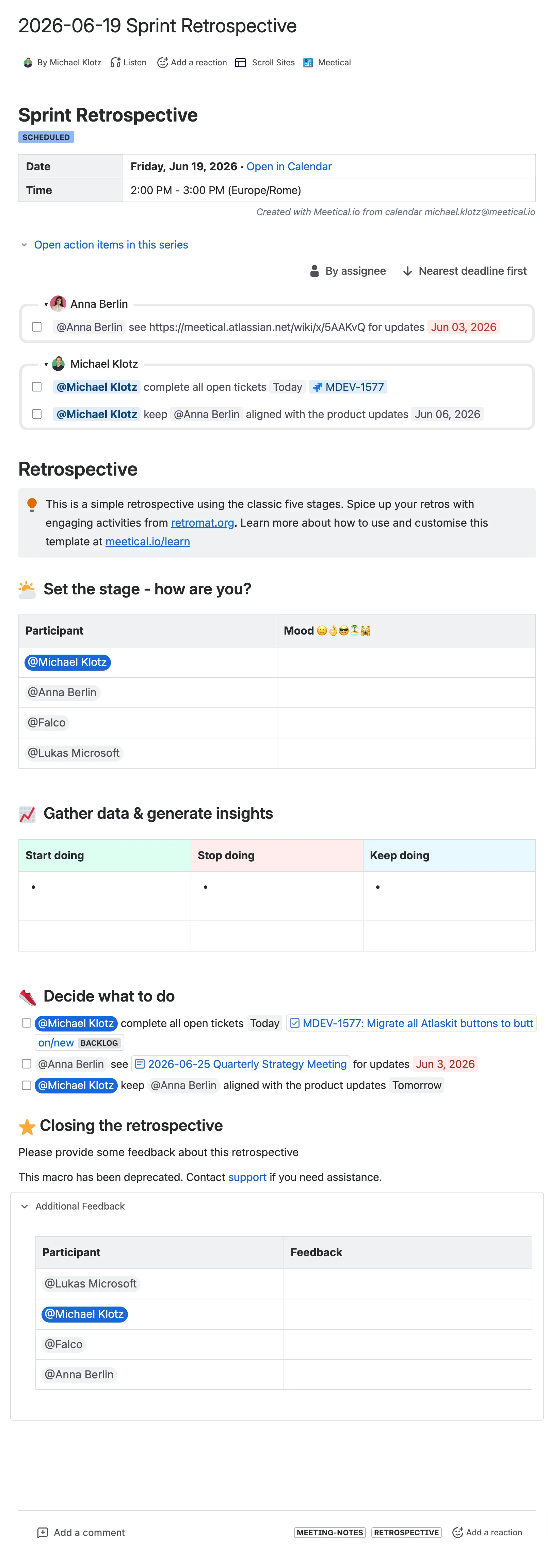
The Retrospective template starts with the meeting overview macro, containing all essential meeting information like date, time, location, and participants.
This meeting template is focused on continuous improvement and contains:
-
Overview - date, time, location, participants, description
-
Set the stage and mood check-in
-
Gather data and generate insights
-
Start doing, stop doing, and keep doing
-
Decide what to do
-
Action Items
-
Closing the retrospective
Customize the templates
Templates are only a starting point. Confluence admins and space admins can adjust the page structure, add or remove Meetical macros, and create additional templates for their own teams. Learn how to install and customize the included templates.
Feedback and questions are very welcome. Reach us at support@meetical.io.