Meetical AI has been released as the early access version! Learn more
Easy Calendar for Jira

Sync Jira releases to your calendar

To subscribe to any Jira release and show the start/end time on your calendar:

  • Navigate to Confluence Top Menu → Apps → Easy Calendar Integration

Screenshot 2024-04-24 at 10.30.57.png
Step 1 - Open Easy Calendar


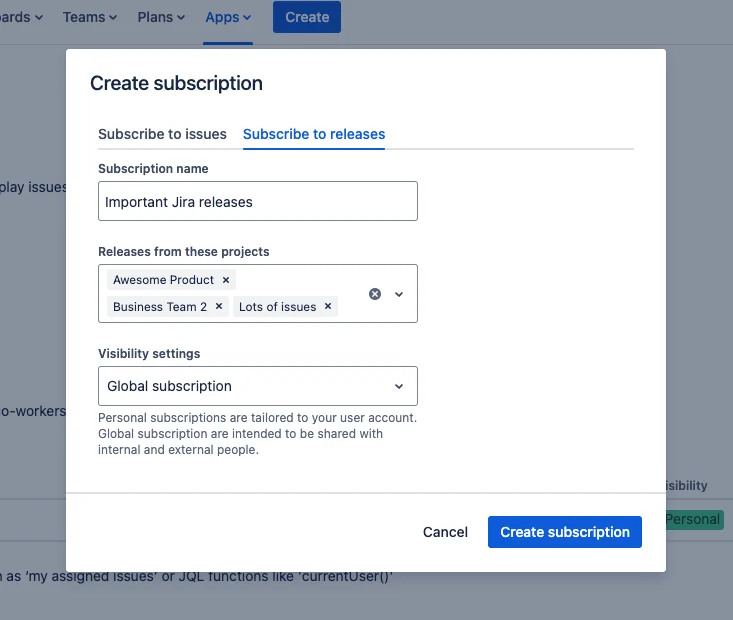
  • Create a Jira Release subscription

Screenshot 2024-04-24 at 09.53.14.png
Step 2 - Create release subscription


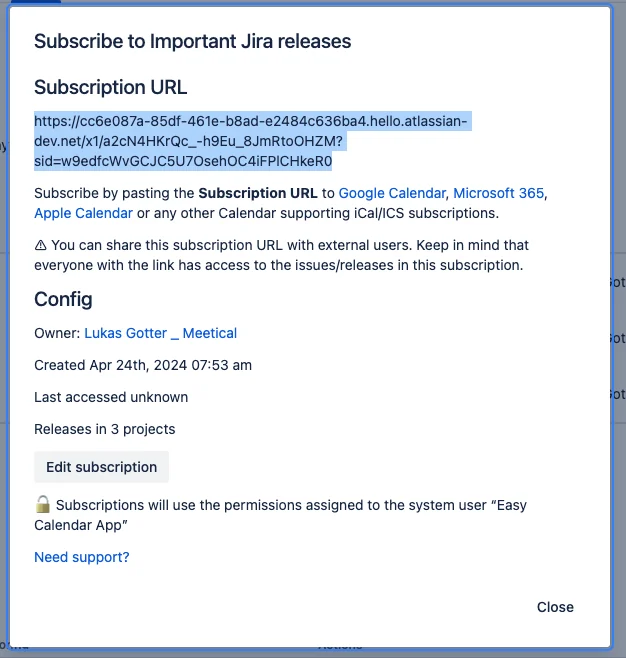
Screenshot 2024-04-24 at 10.41.04.png
Step 3 - Copy subscription URL

And here you go (Example with Apple Calendar):

Screenshot 2024-04-24 at 11.24.20.png
Step 4 - Releases in calendar